1
It Scans
TidyBox reads through your inbox and counts what is there, sender by sender. Scanning alone moves nothing.
Inbox Cleanup, Handled Overnight
TidyBox goes through your junk mail so you don't have to. It scans what arrived, shows you a short digest, and moves only what you approve, into a folder in your own mailbox. Every run ends with a report whose numbers add up.
In private pilot: our team sets you up, one mailbox at a time, and the pilot terms are stated in full under Pricing.
Built for busy people who are done being their own spam filter.
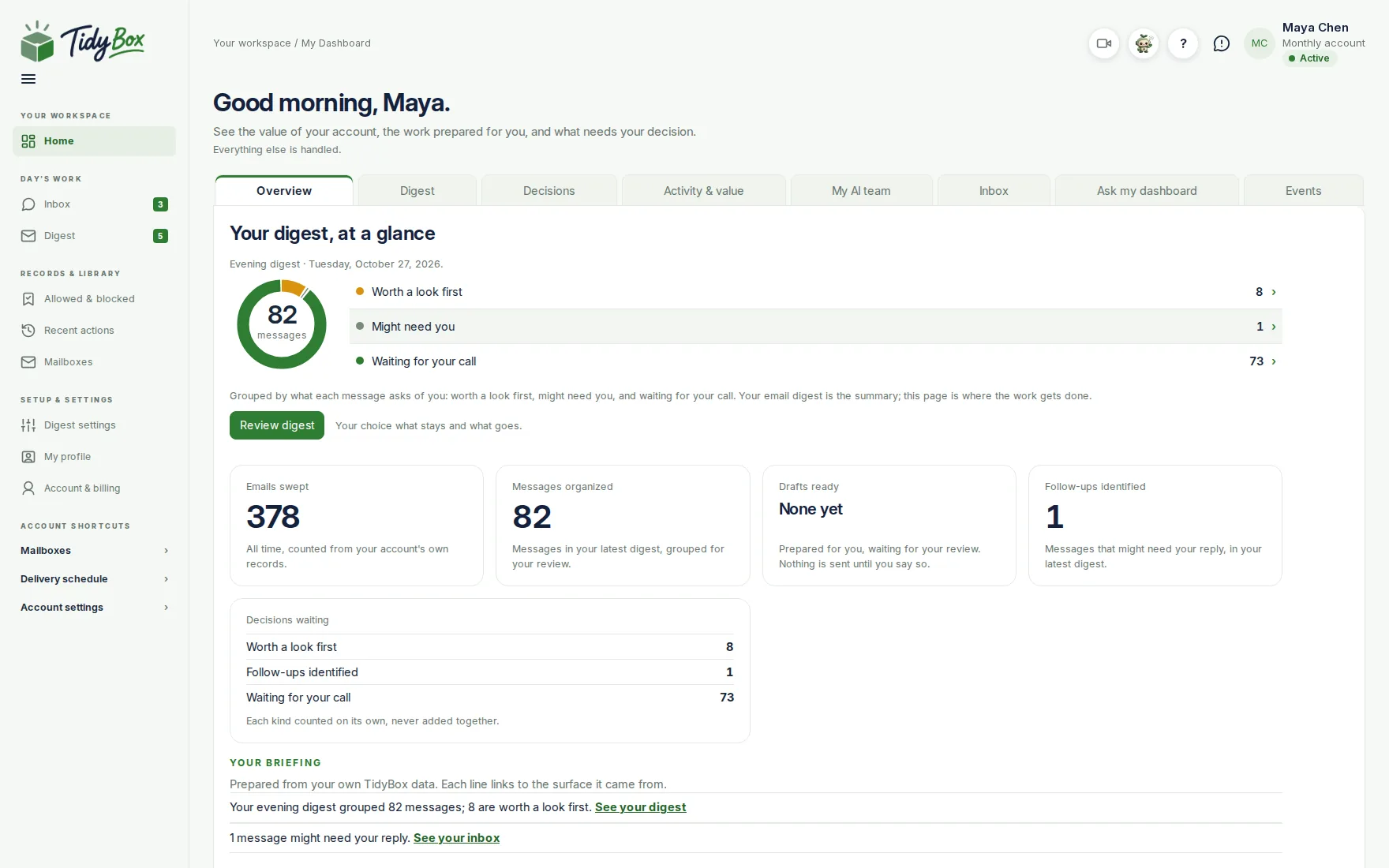
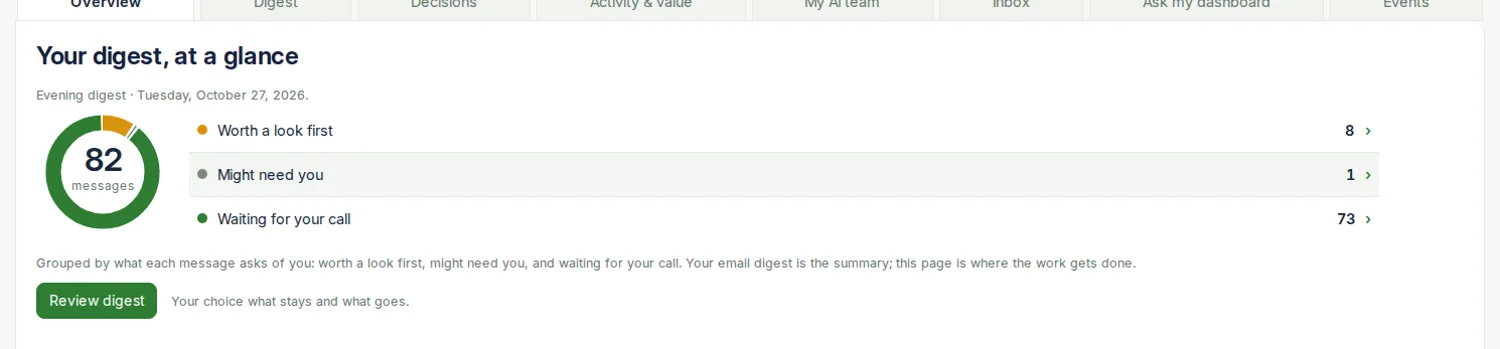
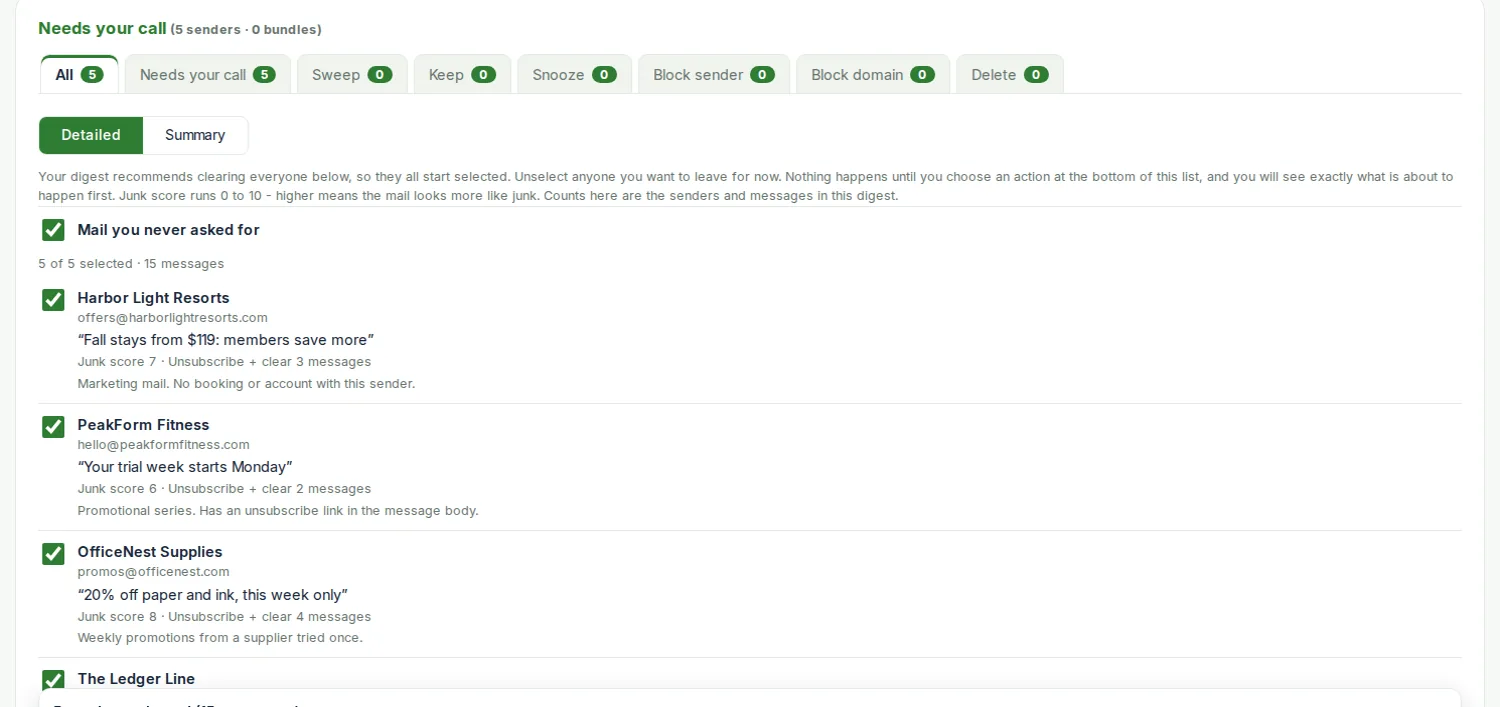

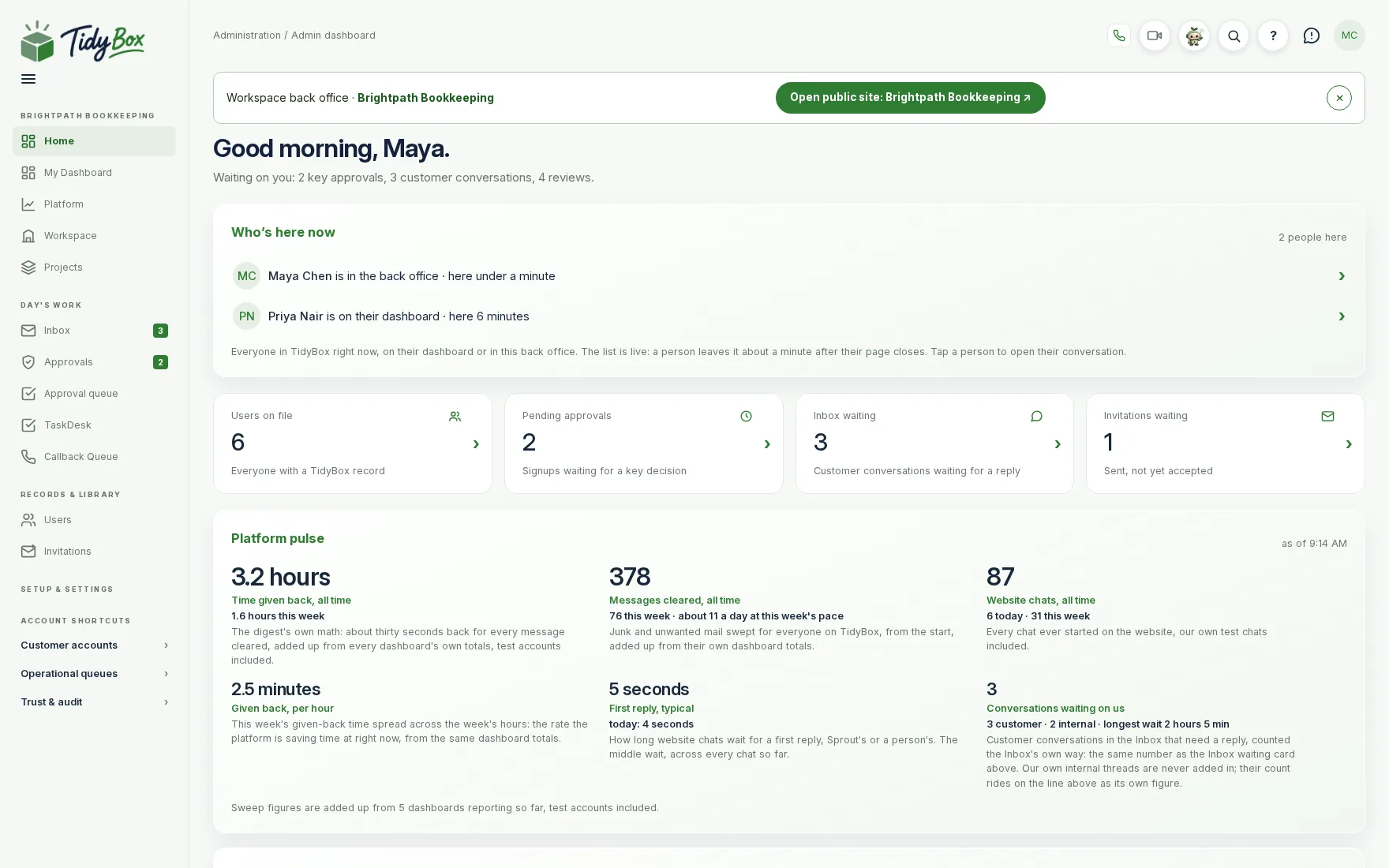
Real screens from the real product, shown on a sample account. The dashboard above is a customer’s morning after a sweep: one digest, grouped by what each message asks of her.
The Receipts
Proof point: a plain completion report after every run, listing what was scanned, approved, moved, and skipped.
Proof point: the report reconciles. Scanned equals moved plus kept plus skipped, and if the numbers ever do not reconcile, the report says so.
Proof point: approved mail moves into 001_TidyBox, a folder at the top of your own folder list, where you can open it, check it, or put it back.

| Scanned | 850 |
| Moved To 001_TidyBox | 712 |
| Kept In Place (Skipped) | 138 |
| Difference | 0 |
This sample is a reconstruction that shows the shape of a real report. In a live report, scanned always equals moved plus kept. If it ever doesn't, the report says so.
How A Night Works
TidyBox reads through your inbox and counts what is there, sender by sender. Scanning alone moves nothing.
The digest groups your mail by sender, with counts. You decide sender by sender. A skip is always respected.
Approved mail moves into 001_TidyBox, at the top of your folder list. Unsubscribes happen only for mail you approved.

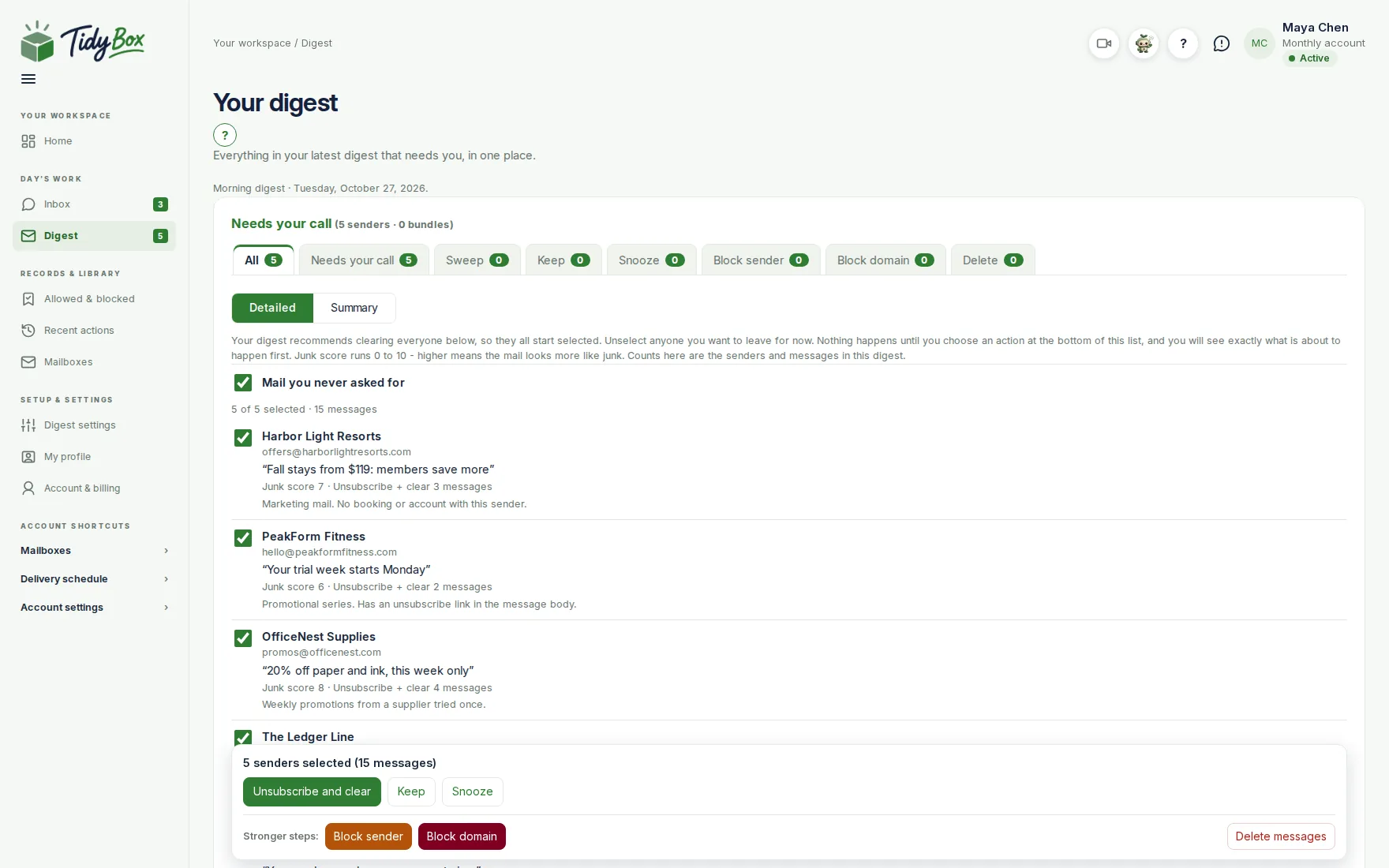
Nothing moves before you approve it. The digest starts with everyone selected, and you unselect anyone you want to leave for now. Your call is the whole system.
From The First Inbox
The first inbox TidyBox ever swept was ours.
IT Problem Solver, Inc. is a small technology firm. Our own inboxes carried the same pile yours does: newsletters never read, notices that matter, receipts, alerts, and the occasional message that actually needed a person. We built TidyBox to go through that pile the way a careful person would, and to show its work.
That is still how it runs. Every screen on this page is our own account, doing its real work. When your mailbox is connected, it gets the same care, and the same report.


| Messages In The Evening Digest | 82 |
| Worth A Look First | 8 |
| Waiting For Your Call | 73 |
| Emails Swept, All Time | 378 |
Read straight off the dashboard at the top of this page. One account, its own records, nothing rounded into a promise.
How Your Mail Is Handled
TidyBox looks at your junk mail. It goes through the pile nobody wants to go through, and it leaves everything else alone.
Swept mail moves into a folder in your own mailbox. It is never forwarded to us, never copied to our systems, and never taken out of your account.
That is the whole job. We read the pile, group it, and bring you the short version, with the receipts.
Who It Helps
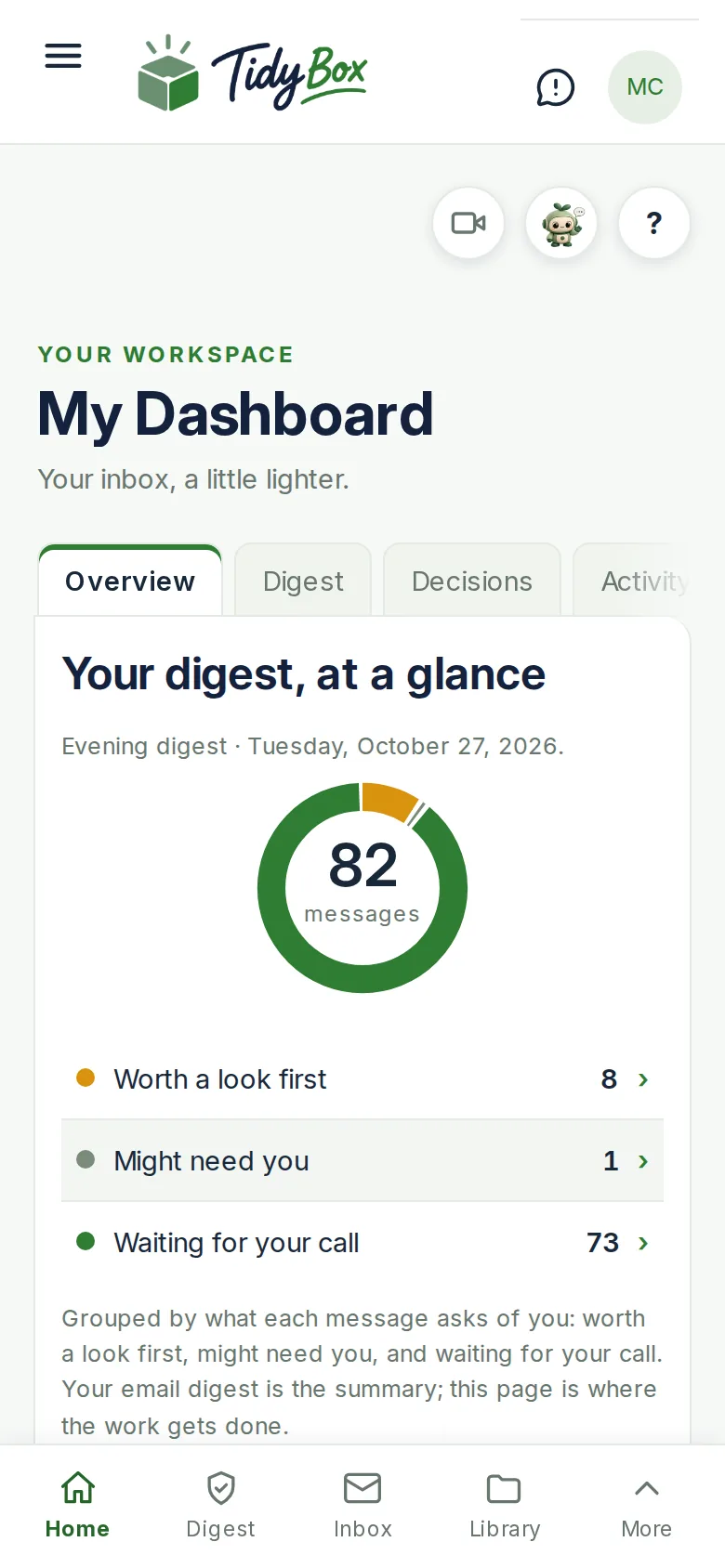
Your dashboard, on your phone, before coffee.
Your inbox fills while you are in meetings, on sites, with clients. TidyBox reads the pile overnight and hands you a digest you can clear in minutes.
Worth a look first, might need you, waiting for your call. Three groups, one decision at a time, and the rest is handled.
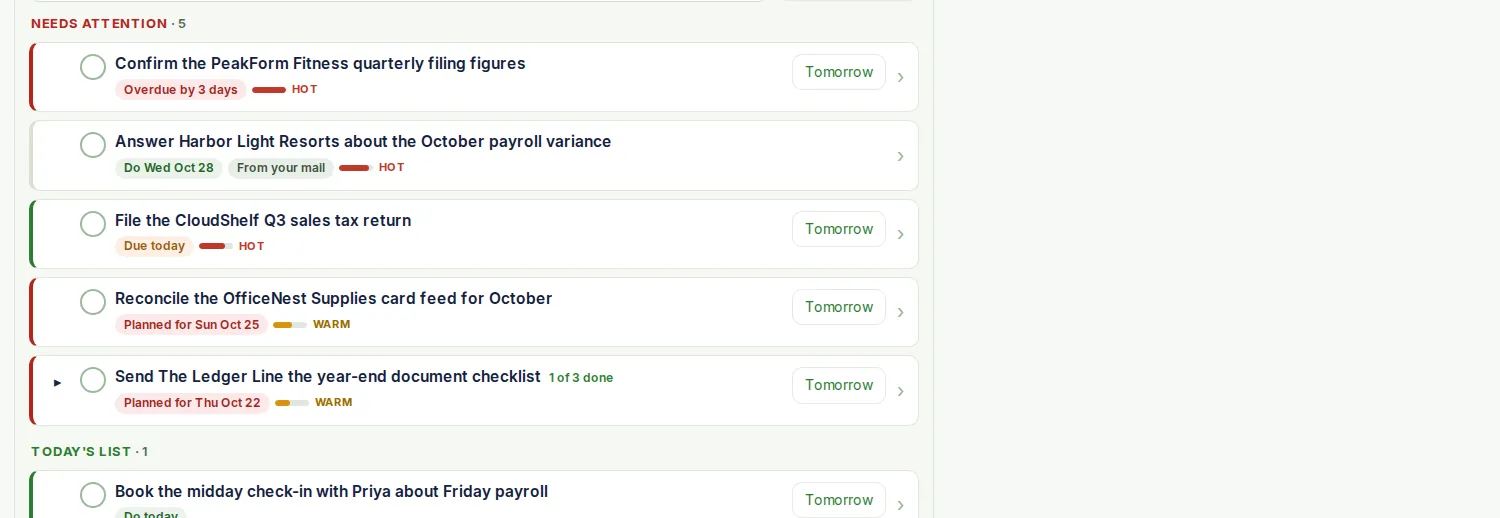
The desk where follow-ups land, across your addresses.
Mail creates work: an invoice to answer, a renewal to confirm, a call to return. The digest clears the noise, and what needs a person lands on one desk.
One desk across your addresses, sorted by what needs attention, so nothing real gets buried under marketing mail again.
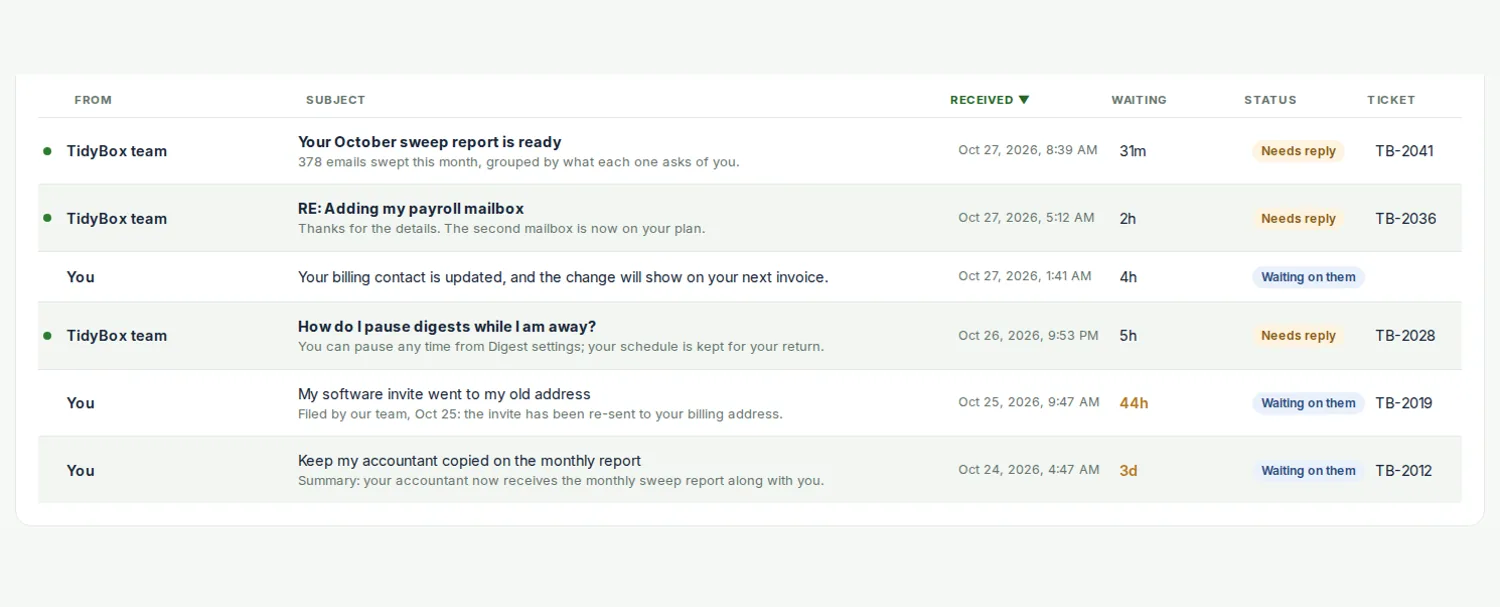
Every conversation with our team, kept in one place in your workspace. Nothing about your mail lives only in email.
Questions
Yes. TidyBox works with Gmail and with Microsoft 365 / Outlook. The digest, the approval step, and the report work the same way in both.
Nothing is moved, unsubscribed, or deleted before you approve it. Approved mail is moved into 001_TidyBox, a folder in your own mailbox, where you can open it, check it, or put it back.
Into 001_TidyBox, at the top of your folder list. It stays in your mailbox. It is never taken out of your account.
It stays where it is. A skip is always respected, on this run and on later runs.
Yes, TidyBox is in private pilot. Joining means you ask for a place, we set you up, and you approve your first digest before anything in your inbox moves. The pilot terms are stated in full under Pricing. The standard subscription price has not been published yet; it will be published on this page before general signup opens.
Join the pilot, approve your first digest, and wake up to the report.
Nothing moves before you approve it. Cancel any time: your mail and your 001_TidyBox folder stay exactly where they are.
Questions first? Email us at [email protected], or ask for a person in the chat and someone from our team will join.
The Whole Process
TidyBox works in three beats: it scans, you approve, it sweeps. It works with Gmail and Microsoft 365 / Outlook, and approved mail moves into a folder in your own mailbox called 001_TidyBox. The five steps below are the whole process, in order.
Step 1
TidyBox reads through your inbox and counts what is there. Newsletters, notices, receipts, alerts: each message is counted under the sender it came from.
Scanning alone moves nothing. Nothing is unsubscribed, moved, or deleted at this stage. The scan exists so the digest can tell you the truth.
Step 2
The digest shows your mail grouped by sender, with counts. One line per sender, so a decision covers every message that sender sent, not just the one you happened to open.
You read the digest the way you would read a summary from a person who went through the pile for you. Short. Countable. Yours to judge.
Step 3
You decide item by item. Approve a sender and its mail may move in the sweep. Skip a sender and its mail stays where it is.
A skip is always respected. Nothing moves before you approve it, and a skip is respected on later runs too, so you are not asked the same question again.
Step 4
The sweep does only what you approved. Approved mail is moved into 001_TidyBox, a folder under your Inbox in your own mailbox. Its name puts it at the top of your folder list, where you can open it, check it, or put anything back.
Unsubscribe sweeps follow the same rule: an unsubscribe happens only for mail you approved. Skipped senders are left alone.
Step 5
Every run ends with a completion report. It lists what was scanned, what was approved, what was moved, and what was skipped.
The numbers in your report add up to your inbox. If they ever don't, the report says so.
| Scanned | 850 |
| Moved To 001_TidyBox | 712 |
| Kept In Place (Skipped) | 138 |
| Difference | 0 |
A Real Run, On Film
The film slot is committed in the site plan: a real run, filmed, not a reenactment. Until the film is published, every screen on this page is the product itself, shown on a sample account.
Questions
Yes. TidyBox works with Gmail and with Microsoft 365 / Outlook, including the unsubscribe handling described in Step 4 for Outlook mail. The digest, the approval step, and the report work the same way in both.
Nothing is moved, unsubscribed, or deleted before you approve it. Approved mail is moved into 001_TidyBox, in your own mailbox, where you can open it, check it, or put it back.
Into 001_TidyBox, a folder under your Inbox. The 001_ prefix pins it to the top of your folder list. If the folder is missing, it is created the first time your mailbox is processed.
It stays where it is. A skip is always respected, on this run and on later runs.
Yes, TidyBox is in private pilot. Joining means you ask for a place, we set you up, and you approve your first digest before anything in your inbox moves. The pilot terms are stated in full under Pricing. The standard subscription price has not been published yet; it will be published on this page before general signup opens.
Your mail grouped by sender, with a count for each sender. One line per sender, so you decide about a sender's mail as a whole.
If your mailbox is connected, yes: TidyBox works inside that mailbox, on our systems, while your computer is off. If TidyBox runs on your computer, the scanning and sorting happen on your machine. The Privacy And Security page explains both ways in plain words.
What was scanned, what was approved, what was moved, and what was skipped. Its numbers add up to what was scanned, and if they ever don't, the report says so.
Pricing
No call is needed to learn what TidyBox costs, now or later. What is not settled yet is labelled as not settled, in the open.
TidyBox is in private pilot. Pilot members are set up by us, one mailbox at a time, and the first thing a member ever sees is a digest to approve. Nothing moves before that approval.
Pilot members get the full product described on this site: sweeps, digests grouped by sender, approval item by item, moves to 001_TidyBox, and a report after every run.
If you join during the pilot, your pilot terms are the terms stated here, and they hold for you while the pilot runs.
The standard subscription price will be published on this page before general signup opens. It will appear here, at full size, with its billing period stated beside it. Until it is published, no figure stands in its place.
OQ-1 Labelled Placeholder
The standard price is an open question, held by the founder. This block is where it will stand.
Everything on this site is the product: the scan, the digest grouped by sender, approval item by item, the sweep into 001_TidyBox, unsubscribe handling for approved mail, and a completion report after every run.
There is one product, described in full. What a plan includes is stated on this page, and this page is the whole statement.
You can cancel any time. There is no retention maze and no call to sit through.
When you cancel, your mail and your 001_TidyBox folder stay exactly where they are. The folder is in your mailbox, and it remains yours.
Joining means you ask for a place, we set you up, and you approve your first digest before anything moves. Questions first? The Privacy And Security page answers them in plain words.
Privacy And Security
When you connect your mailbox, TidyBox works inside that mailbox. We take our instructions from you, inside your own account, and we never move your mail out of it.
Your mail stays in your mailbox. Swept mail moves into a folder in your own mailbox, where you can open it, look at it, or put it back. It is never forwarded to us, never copied to our systems, and never taken out of your account. If you ever leave TidyBox, everything in that folder stays with you.
TidyBox works inside your mailbox, on the mail already in it. This is the standard way TidyBox runs, and it works while your computer is off.
On request, TidyBox can run on your computer. In that case, your mail stays on your computer.
The scanning and sorting happen on your machine. Nothing is sent to us.
In connected mode TidyBox works inside your mailbox. In on-computer mode, the scanning and sorting happen on your machine. Either way, your mail stays yours: in your mailbox, or on your computer.
TidyBox reads your mail to sort it. That is the work. It reads a message to count it, to group it with the rest of that sender's mail, to say why it looks like junk, and to prepare the reply drafts you ask for.
TidyBox does not use your mail for any other purpose. Your mail is never sold, never used for advertising, and never used to train models. It is never used to build products for anyone else. Your mail works for you, in your mailbox, and for nobody else.
Information that is not in your email.
Email we have no reason to look at. TidyBox reads mail to sort it. It is not a general window into your account, and we do not use it as one.
Your contacts, your files, or your other accounts. TidyBox works on email. It does not read your address book, your documents, or anything outside the mailbox you connect.
Payment details. TidyBox is a sorting service. It never asks for, reads, stores, or sends payment information of any kind.
We keep what we need to run the service for you, and we show you what we keep. TidyBox keeps the digest record of what was scanned, what was approved, what was moved, and what was skipped. That record is yours. It is the report you receive after every run, and you can ask to see the full record at any time.
You can also ask us to delete your records. If you ask, we delete them, and we confirm the deletion to you in writing.
If we ever learn of unauthorized access to information held by TidyBox, we will tell you. We will tell you what we know, when we knew it, and what we are doing about it, in plain words, without making you ask twice.
This page is written plainly on purpose. Privacy policies are often written to be unreadable. Ours is written to be read, because the thing it protects is your mail, and you should be able to check what we say against what we do.
Platform
TidyBox is one product in the IT Problem Solver, Inc. platform of workspaces and modules. This page says who stands behind it.
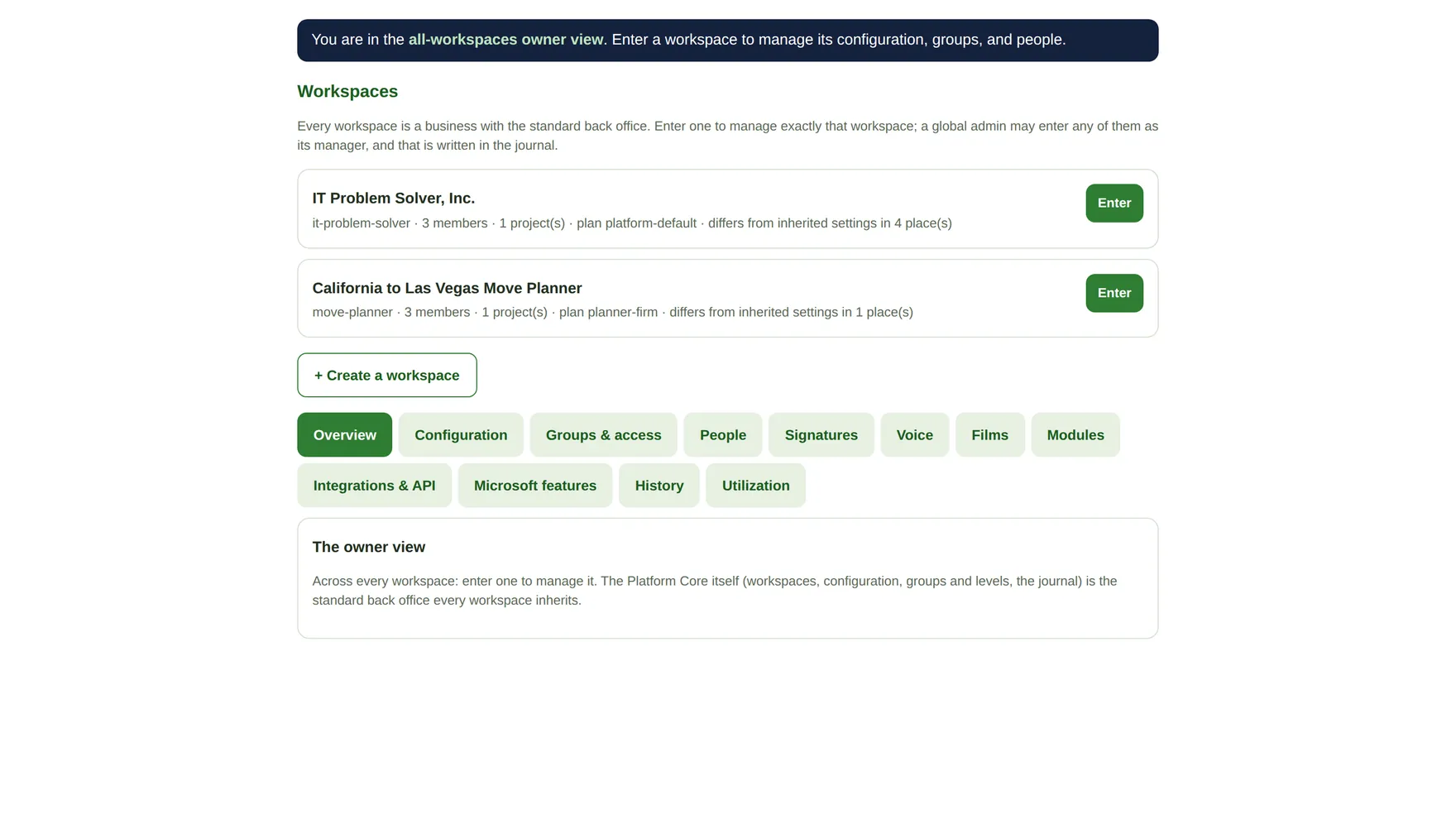
We are IT Problem Solver, Inc. We build the platform this product runs on, and we run TidyBox ourselves, on our own work mail, every day. TidyBox is our inbox cleanup product: it sweeps cluttered inboxes for people whose work is correspondence, and it answers for every run with a report.
When this site says "we", it means the company. Our name is on the product, on the platform, and on this page.
The first inbox TidyBox ever swept was ours. Our founder runs TidyBox on his own work inbox first. Every feature ships there before it ships to customers, and every run there ends with the same report a customer gets: what was scanned, what was approved, what was moved, what was skipped.
That order is deliberate. A product that asks to touch your mail should be run, hard, on the mail of the people who built it, before it is offered to you.
A workspace is the home for a piece of work. It holds the people, the settings, and the records for that work in one place, separate from other work on the same platform.
Modules are capabilities that can be enabled per project. A project turns on the modules it needs and leaves the rest off. TidyBox is the inbox cleanup module: the product this site describes, enabled where inbox cleanup is the work.
Email first. Calendar and contacts are separate, named additions, agreed in plain words before anything is connected.
TidyBox follows the pattern the platform is built on: nothing happens without approval, every run shows its work, and the numbers reconcile. The digest, the approval step, the move into 001_TidyBox, and the completion report are that pattern applied to your inbox.